


 Reply With Quote
Unfortunately I haven't seen anything like that so far. I'd be interested too.Originally Posted by Inertial

What kind of hard hacking are you thinking about?

 Junior Member
 One more happy wl500gP with 128M ram upgrade!
Big thanks to Oleg and all the contributors!
I’ve been looking around for a small form factor computer to use as the main computer of a mobile robot, when it occurred to me that routers are actually becoming some very good examples of physically small computers.
Linux is my OS of choice for such projects, so I was very happy to learn about the wl500gP + Oleg's firmware combo.
Spec's-wise the wl500gP it's nearly all-ready out of the box, but then again, one can never have enough memory!
Then I landed on that 128M memory upgrade post by Oleg, and this is the story:
Components:
After a week long search some NANYA NT5DS32M16BS-5T were located. So why not give it a try? There was no confirmation for these back then, though according to the datasheet they were pin compatible and organised as 32x16. But when I was about to acquire them, I got a call from a second-hand store, about some SO-DIMM with Samsung K4H511638C-UCB3 gathering dust on their shelves, so that was it! These were confirmed by trucki and way cheaper too.
(Thanks to particleman we now have a confirmation for NANYA NT5DS32M16BS-5T)
33 Ohm smd 0402 resistors were kindly donated from an old dvd player, (one for A12 line, one more to replace an accidentally desoldered and lost one)
Method:
- Used a hot-air gun (the paint-stripping gender) to preheat the pcb and then desolder the (fluxed) memory chips, while protecting the rest of the pcb with multiple layers of aluminium foil as a heat screen, both from the SO-DIMM and the wl500gP.
- Applied no-clean flux on the pads, then removed the solder from the pcb pads with desoldering braid (wick).
- Cleaned around with some alcohol and some cotton buds.
- Positioned the chip, then kept it in place with some scotch tape (it *really* helps).
- Used a fine tip, low wattage soldering iron with tiny amounts of solder applied on the tip.
- soldered pins under optical aid.
- cleaned around some more.
- Scanned and hi-res macro-photographed the result from various angles to visually inspect on screen.
- checked for sort / open circuits with a multi-meter.
- reworked a few stubborn pins.
And voila! It didn't workno power led on
disappointment

At the time it was already very late at night, so I slept over it, many nights, and when I found the time, armed with multimeters, optical aids, pencil and paper for an improvised schematic, datasheets, previous pic's of the tracks under the chips and quite some patience I checked again every single track and pin on the first chip (U3). Pins 18 (Vdd) and 4 (DQ1) were found to be loose, giving false positives when pressed on their pads with the multi-meter probe. They were resoldered while I pressed down on them with a pointed tool and voila, router finally up and running!U4 was not much of an issue and soon I had all 128M of ram activated!
At first strong vibration would freeze the router (more loose pins) but then the soldering iron came again in to play, and everything worked just fine!
The router went through twelve runs of memtest and all is fine! Router is happy, I am happy, big Thanks Oleg!
Here is a reference list compiled from this forum with all chips known to work so far for wl500gP:
Note 1: Capacitor between pin 51 and ground / Clock lines employed.Code:Chip: By: On memory module: Type: Form: By: Confirmed by: Note: HY5DU121622CTP-D43 HYNIX HYMD532646CP6J-D43 PC3200 DIMM HYNIX Oleg 1 K4H511638B-TCB3 SAMSUNG M470L6524BT0-CB3 PC2700 SO-DIMM SAMSUNG Oleg . K4H511638D-UCB3 SAMSUNG M470L6524DU0-CB3 PC2700 SO-DIMM SAMSUNG Oleg . D5116AFTA-5B-E ELPIDA TS32MSD64V3M PC2700 SO-DIMM TRANSCEND Oleg . K4H511638F-TCB3 SAMSUNG newbiefan . K4H511638D-UCB3 SAMSUNG newbiefan . K4H511638C-UCB3 SAMSUNG KVR333X64SC25/512 PC2700 SO-DIMM KINGSTON trucki . MT46V32M16-6T MICRON mitek 1 NT5DS32M16BS-5T NANYA particleman . K4H511638B-TCB3 SAMSUNG oyabun . K4H511638C-UCB3 SAMSUNG M470L6524CUO-CB3 PC2700 SO-DIMM SAMSUNG inertial . HY5DU121622CTP-D43 HYNIX NotebookKiller 1
Note 2: Infineon chips are reported as not collaborating with wl500gP pcb.
Be warned that the pcb pads are really easy to damage, static electricity could fry the chips, thermal shock could destroy them as well as the pcb and other components, flux/solder fumes are usually toxic, etc.
Before attempting such a mod it would be useful to search for "SMD desoldering" on the net, since there are many informative how-to's and even videos on the subject, get familiar with the "reflow thermal curve" and "ESD damage", practice desoldering and soldering on some scrap pcb's first and make sure you won't miss your router too much if things go wrong.
Admittedly, coming from an H/W background I have quite extensive soldering/desoldering experience but I still believe it's possible to perform the mod when having some soldering experience and rehearsing the steps on some scrap first.
@breizh76:
I am pretty sure your asus is recoverable, have a look at what these people from http://www.circuitmedic.com are doing.
Agreed it requires lots of tools and even more skill, but still it is possible!
Got four partially lifted pads myself, when desoldering U3 but finally everything works fine.
Had a 60G HD too with many cut and lifted tracks 'few years ago, but managed to functionally restore it (visual aesthetic aspect though... ouch!)
If you don't feel confident, you could find some hardware-tech / mobile-phone repair-tech guy that could do it, or even I could try and have a go at it, if you post me your unit.
@All:
Could any one direct me to some wl500gP schematics, if such thing is available? I’d like to try some extensive wl500gP hard-hacking
Inertial
Member
Unfortunately I haven't seen anything like that so far. I'd be interested too.
What kind of hard hacking are you thinking about?
Junior Member
 Expansion possibilities inspirations for wl500gP routers
Hello!
Most of my inspiration came by looking at these pieces of information: (attached below)Originally Posted by Oyabun
What kind of hard hacking are you thinking about?
* BCM4704 Block Diagram
* BCM4704 System Diagram
Well besides the gpio pins, I2C bus, SPI bus, SD card, etc type hacks, (directly off wl500gp pcb tracks), the most promising thing, may be the ability of BCM4704 processor to handle three mini-PCI 2.3 peripherals.
Another way to explore would be the EBI (Expansion Bus Interface) route. Signals for this bus are presented to the flash memory chip (SPANSION S29GL064M), of course stealing them from the chip's pads seems extremely hard, but it might still be an option for just a couple of lines. And since extremely hard is still possibleFrom Broadcom's BCM4704 Product Brief:
The PCI 2.3 host interface allows enumeration of three external PCI peripherals (more with external arbiter), one could even try an IDE connection if all necessary signals are found to be present and the firmware side of things in understood as well (that already sounds pretty complex to me).
Other interesting things are the modem and audio codec’s as well as the two-port USB 1.1 host. Interesting these are, however, only if their respective signal/data lines are present somewhere on the pcb, since un-burying them from under the BGA
Software-wise, access to the MAC (Multiply Accumulate) unit on-chip would be very useful to people who wish to hook up some sensors on the wl500gp and then use it to perform some DSP (digital signal processing) on the collected data.
Also software-wise, access to the IPSec Core and related hard-wired functions available in the BCM4704 (IPSec 3DES, SSL MAC, TLS HMAC, SSL/TLS DES/3DES, MD5/SHA-1 HASH, IPSec AES), would be very useful for some types of network applications.
All of the above require, inside knowledge of the processor core, usually found in a Programmer's Guide type document and in datasheets, for the software part, whereas for the hardware part, processor datasheets and router schematics would be needed. Without any of these documents in sight, it's gonna be pretty hard to attempt most of these modifications.
That's why I believe mini-PCI peripheral expansion is the most viable approach, given the available documentation.
PCI's, let's sum it up, we have: One for the PCI-to-USB bridge (VIA VT6212L), one more for the actual mini-PCI connector harbouring the wi-fi card, that's two, leaving room for (hopefully) one more! Plus all the signals for the PCI bus should be presented to the mini-PCI connector. That's only a guess however, I haven't actually checked to verify that, but still. The specifications for PCI and mini-PCI bus are at hand, so it will be a matter of (spare) time to verify it.
After verifying that all necessary signals are present and that the firmware (as is or modified) could handle such an addition, it might be possible to try and solder one more mini-PCI card connector on the existing pcb pads.
Many mini-PCI cards are available which could be used to offer additional functionality, provided the suitable driver exists, that is.
* mini-PCI to IDE and/or SATA controllers + Compact Flash (CF) Socket, (no USB bottleneck)
* mini-PCI to (a multitude of) serial ports extension cards
* mini-PCI GPS receiver module with extra serial ports
* mini-PCI 801.11a/b/g 400mW card
* more examples welcomed
A simple idea would be to add an extra dual band wi-fi card, transforming the router to a link, or even backbone node for wireless metropolitan networks. A GPS card would suit locative (location-aware) applications. The extra serial ports would be good for robotics or home automation and a direct mini-PCI to IDE/SATA/CF card would allow for file transfers at full speed, overcoming the USB bottleneck. I could go on daydreaming about possibilities for long...
Take a wl500gP, hook up some temp, humidity, pressure, wind-speed, rainfall, etc sensors over USB or serial ports and you get a remote, networked, weather-station. Or add some motors and motor drivers assortments, vision, GPS, batteries, sensors (speed, distance, temp, inertial, rotational, magnetic, etc) a few microcontrolers, quite some code, and voila: you have a networked mobile robot...
For the moment my preferred (and much more realistic) approach is to interface microcontrollers to the RS-232 and USB ports of the router. I'm planning to work with some PIC18F4550 with USB connection while some other PIC boards with rs-232 are already available and have plenty of things interfaced to them. Now I only need to set up a cross compiler for the wl500gP and write some code to get them to communicate with the router (and, hopefully, one day, attempt even native compilation). Some more code writting/porting will be needed to have the router perform some processing on the data collected through the uC's and plan some actions to execute on the devices interfaced to them in response, all while sending part of the data over lan/wi-fi. The birth of a simple robotics platform, indeed.
Following the various posts about the RS-232 console connection, and parper's post "Additional USB ports and Internal HD!", I performed the corresponding mod's, and now I have a very happy wl500gP with Oleg's firmware, 128MB ram, four onboard USB 2.0 ports and two RS-232 signal level serial ports.
I will post methods and findings soon!
Ideas, comments, suggestions are welcomed
Greetings to all and thanks for all the info's you are sharing,
inertial
Below are some very inspiring BCM4704 Diagrams from Broadcom's Product Brief, a picture of wl500gP's case following modification to house the extra two USB connectors, and a couple of pictures of the actual post mod pcb.
Member
Great!
Count me in. I have bit limited time now, as I'm in a middle of a NAS building project based on the StormSemi Gemini SL3516. Adding mini PCI slot would be great. I have already found miniPCI Sata controller with flash support. It would be an interesting project to build a small embendded server based on the new ssd disks. Also the networked weather station sounds like a great idea. If it would support mesh architecture and and seismology (vibration sensors) coupled with a solar panel and some batteries it could make up for a great science platform for earthquake forecasting.
At the moment I'm working on a more mundane project though. I have a flat what I rent out what happens to be in a very lucky spot of the city so I can get 10M/10M cable net connected on it. Even though I live only four streets away, this option is not available here, so I'm building a torrent seed server for the other flat. I will be able to log in and start downloads remote, and when the download finished it will syncronise automatically to my home nas trough sftp. I'd like to connect a security camera tooking to an area what not interferes with their life (eg. entrance), but helps if something happens with the flat. Also would like to connect smoke sensors to send alarm trough the net. I would like to have everything in one neat package (so HDD inside the case, proper cooling etc) to avoid accidental disconnects, ect.
Meanwhile the tenant will be able to use some part of the bandwidth trough wireless - with a QOS service - for a reduced fee. For this I'll most probably use my current 500gP and buy a new 500W for our home.
ps.: In the meantime I just finished a second transplant to 128 Mb on a friend's asus. Flawless, started right away and stable.
ps2: Do you think that the factory power supply is enough to power all your installed ports? I had unexpected reboots even when tried to connect the USB HDD and a flash disk at the same time.
ps3:Probably we should start a new one about HW hacking instead of hijacking this 128Mb upgrade topic.
Junior Member
 Exploring WL500gP hardware expansion / interfacing possibilities
Wouldn’t it be nice to have a thread dedicated to hardware hacks, hardware interfacing and expansion fantasies, and the stories of our quest to turn them in to reality? As discussed in the “Upgrading WL-500g Premium, WL-500W and WL-700gE RAM to 128 MB” thread there are many such possibilities, for wl500gP and other routers as well.
Inspired by the fact that a wl500gP with 128MB RAM can do quite some things on top of it’s base duties, and considering that the software – firmware – networking part of these is pretty well taken care of in the forum
Hopping to see postings on the subject of:
* Sensors interfacing
* Motor control
* Robotics
* wl500gp bus expansions
* Interfacing to microcontrollers and custom hardware through RS232 / USB / LAN / Wi-Fi / Bluetooth / (…)
* Interfacing to GPS modules, to smart phones, to PDA’s, to GPRS modules,to harddisks / Compact Flash's
and in general, on upgrades and hard-hacks of any kind , I welcome us all!
Inertial
Junior Member
 eeprom interface
EEPROM interface
1. VT6212L (usb) have eeprom interface:
- EECS (O) - pin56
- EECK (O) - pin55
- EEDI (O) - pin50
- EEDO (I) - pin49
VT6212 specification does not mention about register to control this interface - maybe someone have any drivers that can do this?
.................................................. .............|USB1|USB2|USB3|USB4|1+--2 _3 4
2. BCM5325 (ethernet) eeprom interface:
- SCK - pin7
- SS# - pin8
- MOSI - pin6
- MISO - pin5
Interesting could be to access this interface via MII interface (used by processor to configure switch). Need detailed registers description to do it.
...........................................{EEPROM}.........V
FCC Dochttp://pudeev.livejournal.com/26318....195278#t195278
Last edited by Omega; 09-06-2012 at 23:37. Reason: fixed
Junior Member
In order to remove the uncertainty around the current consumption levels of the various usb peripherals that may be connected on a wl500gP (modified with extra USB ports or just plain, straight out of the box), an experimental current measurement set up was used.
The router was supplied with power through a digital millimetre, set at 10 Amps range, then the current consumption of various configurations of hardware was measured. The peek current during power-on of each module was also recorded. The router was modified with 128MB RAM, MAX202 RS-232 dual transceiver, two extra USB ports (taken from VIA chip). Firmware: Oleg's ver. 1.9.2.7-9. Picures of the mods here
Current Measurement During Boot Sequence:
Set up:
Two lan ports connected with PC's
Serial port 0 console connection to the unit
Wi-Fi initially off
No usb devices connected
Result:
Starts at 0.67 Amps for a couple of sec’s, then 0.89 Amps then ranges between 0.85 to 1.05 Amps and then after boot sequence and os-startup is complete stabilizes at 1.00 Amp.
Now we are just at the first prompt after the boot sequence.
Removing one of the two Lan cables dropped the current to 0.95 Amps
Connecting a 1GB flash USB rises at 1.04 (90mA more)
Connecting a 4GB flash USB rises at 1.13 (90mA more)
Connecting a 64MB flash USB rises at 1.18 (50mA more)
Connecting these results on the following messages on the Serial Console:
Please note that the firmware was set up not to mount the USB mass strorage devices upon detection, in order to see if there is any difference in consumption pre-mount and post-mount. So let's mount them manually:Code:echo for PaN ::: &&&PaN hub.c: new USB device 01:03.2-2, assigned address 2 usb.c: USB device 2 (vend/prod 0x19b6/0x1024) is not claimed by any active drive r. hub.c: new USB device 01:03.2-1, assigned address 3 usb.c: USB device 3 (vend/prod 0x90c/0x1000) is not claimed by any active driver . hub.c: new USB device 01:03.1-2, assigned address 2 usb.c: USB device 2 (vend/prod 0x1043/0x8006) is not claimed by any active drive r. / #
That's part of what we get at the Serial Console:Code:/ # insmod scsi_mod SCSI subsystem driver Revision: 1.00 / # insmod sd_mod / # insmod usb-storage
Let's check the mounted devices:Code:usb.c: registered new driver usb-storage scsi0 : SCSI emulation for USB Mass Storage devices Vendor: takeMS Model: USB Easy Rev: 1100 Type: Direct-Access ANSI SCSI revision: 02 Attached scsi removable disk sda at scsi0, channel 0, id 0, lun 0 SCSI device sda: 7864320 512-byte hdwr sectors (4027 MB) sda: Write Protect is off /dev/scsi/host0/bus0/target0/lun0: p1 scsi1 : SCSI emulation for USB Mass Storage devices Vendor: S3+ Model: Rev: 8.07 Type: Direct-Access ANSI SCSI revision: 02 Attached scsi removable disk sdb at scsi1, channel 0, id 0, lun 0 SCSI device sdb: 1918976 512-byte hdwr sectors (983 MB) sdb: Write Protect is off /dev/scsi/host1/bus0/target0/lun0: p1 scsi2 : SCSI emulation for USB Mass Storage devices Vendor: Generic Model: USB Flash Drive Rev: %z!Y Type: Direct-Access ANSI SCSI revision: 02 Attached scsi removable disk sdc at scsi2, channel 0, id 0, lun 0 SCSI device sdc: 128512 512-byte hdwr sectors (66 MB) sdc: Write Protect is off /dev/scsi/host2/bus0/target0/lun0: p1 USB Mass Storage support registered.
Mounting the usb's:Code:/ # df Filesystem 1k-blocks Used Available Use% Mounted on /dev/root 3008 3008 0 100% /
Everything remains at 1.18 Amps... So no difference when the Flash memory usb's are connected, whether mounted or not.Code:/ # mkdir /tmp/hd1 / # mkdir /tmp/hd2 / # mkdir /tmp/hd3 / # mount /dev/discs/disc0/part1 /tmp/hd1 / # mount /dev/discs/disc1/part1 /tmp/hd2 / # mount /dev/discs/disc2/part1 /tmp/hd3 / # df Filesystem 1k-blocks Used Available Use% Mounted on /dev/root 3008 3008 0 100% / /dev/discs/disc0/part1 3924460 1103812 2820648 28% /tmp/hd1 /dev/discs/disc1/part1 959200 703104 256096 73% /tmp/hd2 /dev/discs/disc2/part1 61596 4494 57102 7% /tmp/hd3 / #
Let's turn on wi-fi:
Now it's up to 1.43 Amps (250mA more)(TX Power settings are the default, mini-PCI card is the original WL120G R1.01)Code:/ # wl radio on / #
Connecting a multi-card reader loaded with a 2GB CF:
That's 1.58 Amps after a peak of 1.60
Connecting two more Lan's: 1.70 Amps (100mA more)Code:/ # hub.c: new USB device 01:03.2-3, assigned address 6 / # mkdir /tmp/hd4 / # mount /dev/discs/disc4/part1 /tmp/hd5 / # df Filesystem 1k-blocks Used Available Use% Mounted on /dev/root 3008 3008 0 100% / /dev/discs/disc0/part1 3924460 1103812 2820648 28% /tmp/hd1 /dev/discs/disc1/part1 959200 703104 256096 73% /tmp/hd2 /dev/discs/disc2/part1 61596 4494 57102 7% /tmp/hd3 /dev/discs/disc4/part1 2000064 1706400 293664 85% /tmp/hd4 / #
Initiating a large file transfer between two pc's connected over lan through the wl500gp doesn't affect current consumption which remains 1.70Amps
Disconnecting all usb flash memory devices, leaving only one lan connection, Wi-fi, and the RS-232 console too: 1.18Amps (520mA less)
Wi-fi turned off: 0.92Amps (260mA less) (It was 250mA up when turned on, but that's the reading i got)
Now to the interesting part:
60 GB, 2.5'' IDE HD connected through e-quip IDE to USB adaptor, power supplied from usb: 1.45Amps during several spin-up seconds then 1.25 Amps (530mA peek, 330 there after)
Disconnecting the usb-HD, connecting an external one:
250GB 3.5'' maxtor external HD, externally supplied: 1.02 Amps, no peek observed. (100 mA more)
I also checked the re-settable poly-fuses (on the mainboard) used to protect the router from USB overcurrent and they are rated 0.750 mA. I checked their specs from their manufacturer and it turns out they trip at 1.5 Amps(!), not that i would recommend connecting anything that heavy though.
So as thing are connected now on the modded router, three usb devices are supplied from the power initially intended for one of the two original usb ports while the other get's all the current by itself.
I had to stop experimenting at that time, but still want to take measurements during file transfers from/to the Flash memory devices and the usb-HD. These are sure to draw more current, how much exactly remains to be measured...
To sum it up, here are the same results, presented in a table:
Also note that the usb ports will try to provide as much current as possible and the poly-fuses protecting them will only trip somewhere in the region 1Amp - 1.5Amps (guess not tested) (usb protecting Poly-fuses marked "P.075", WL500gP board version R1.14). There is also the Poly-fuse protecting the main power supply, (Main Poly-fuse marked "P.260", WL500gP board version R1.14). In general poly-fuses trip, when the current exceeds by some percentage their rating and then, once the overcurrent condition has been removed, conduct again when they have cool down.Code:Device/Action: Current Peek Current Consumption: Consumption: Asus WL500gP start-up (+2 Lan) 670 mA - Asus WL500gP boot (+2 Lan) 850 - 1050 mA 1050 mA Lan connected (each) 50 mA - 1GB iStar, usb Flash memory 90 mA 90 mA 4GB takeMS, usb Flash memory 90 mA 90 mA 64MB, usb Flash memory 50 mA 50 mA usb multi-card reader with 2GB CF 150 mA 170 mA Asus wl-121 mini-PCI power-on 250 mA - 2.5'' IDE HD - USB (internal) 330 mA 530 mA 3.5'' IDE HD - USB (external) 100 mA -
I hope this info may be useful somehow
Greetings to all
Inertial
Attached: 1) The measurements set up. 2) Cable connections (little cables usb mod supply, larger cables router supply)
Last edited by Inertial; 28-04-2008 at 13:46.
Junior Member
Following some posts in the forum on the RS232 port subject, a dual RS232 line transceiver was implemented, based on a 5-Volt, max202, narrow-SOIC 16pin chip. Spec's say that anything below 0.8 Volts is perceived as Low-Level signal whereas anything above 2 volts is perceived as High-Level signal so the 3.3 volts from the board are definitively interpreted correctly as a High-Level. Supply-voltage-wise the requirements range between 4.5 to 5.5 volts, so the on-board regulated USB supply kindly donates the appropriate voltage (and a maximum current of 15mA), keeping everyone happy. MAX202 is oriented towards battery operated, handheld applications, and only needs five 100nF capacitors to operate. Using smd ceramic capacitors results in a very small sized pcb. The transceiver circuit was tested OK using a USB to RS-232 converter and a plain-old RS-232 port (still quite a few of those available around).
The default settings for connection to the WL500gP over RS-232 are 115200 Baud rate, 8 Data bits, No Parity, 1 Stop bits, No Flow Control.
Port 0 is console, port 1 is free to use, both are found on /dev/tts/
will sent a string to rs-232 port one.Code:echo "Hello Network" >> /dev/tss/1
Note: FTDI based USB to RS232 converters work fine with Oleg's firmware ver. 1.9.2.7-9. and provide connection for extra micro-controllers if need be.
I will update this post with schematics / more details / better pic's and hopefully in the later future with a small pcb design.
Visible in the photo is the unorthodox use of an old prototyping board with tracks split in two, and some smd capacitors mounted in equally unorthodox orientations. that wasn't rapid prototyping, but rather impulse prototyping
Greetings
Inertial
Member
A bit of a different USB implementation.
The principle is the same - in a way, that goal was to enable the two unused USB ports on the router - with maximum tidyness and serviceability in focus. Clicking on picture brings up bigger image.

Last edited by Oyabun; 28-04-2008 at 12:57. Reason: resized picture
Junior Member
Additional USB ports mod refinement
Hello again!
Following the post "Additional USB ports and Internal HD!" by parper, I decided to add two more USB ports by soldering tiny wires on the pins of the VIA (VT6212L) chip. I used very thin veneer-insulated copper wire taken from the coil windings of a Cathode Ray Tube (CRT) of an old monitor. I had a bit of a trouble finding the correct circuit schematic and component values on the forum or the net (I failed to actually), so I examined the wiring of the existing USB ports and used a multimeter to figure these out. The findings are: Each one of the data pins (usb3D+,usb3D-,usb4D+,usb4D-) is tied to ground by an 15K ohm resistor and filtered in pairs using magnetically coupled inductors. Power supply and grounding are also filtered by inductors and capacitors. The configuration I finally went with is: four 15K ohm resistors tying the usb data pins to ground, and some simple LC (inductor capacitor) filter for the positive power supply. Having trouble to locate suitable smd resistors in the "junk pile", pairs of 10K ohm and 4k7 ohm resistors off an old ink-jet printer board were used in series. The 100nf ceramic disc capacitors and ferrite beads for the supply filter were kindly provided by the same old monitor as before.
A standard dual stacked type A female pcb connector was "slightly" modified and the end result is quite acceptable. The case is also modified, with a rectangular hole between the WAN and LAN1 connectors, to house the usb connector.
In details, the usb connector was fitted with an eight pin standard 2.54 cm pitch gold plated male connector, while the rest of the circuit (pull-ups and filters) was attached to it’s respective female connector. The usb connector is not attached to the wl500gp PCB, and it’s only held in place by the metallic springs on the top and bottom of it’s body, holding against the rectangular opening on the case.
I have later refined the USB mod. This was needed since I already had managed to remove most of the fine wires while accidentally pulling the resistor – filters pcb. Oyabun is right: the previous implementation of mine was a little mess!
Happy modding!
Inertial
Bellow are some pictures, one during the fabrication of the small pcb (included for it's strange beauty and it's mild industrial after-taste), and two more of it as it looks on the board. The little wires were not soldered on it yet; since it took 24 hours waiting for the epoxy to fully cure. The last picture shows the final arrangment with the little (fragile) wires in place.
Last edited by Inertial; 28-04-2008 at 15:53.
Junior Member
@mitek: Thanks for the info!
Asus WL-500b (BCM5325M) - EEPROM AT93C46 (U9 8pin)
http://wl500g.info/showthread.php?t=5593
Asus_WL-500_Gold_Premium_rev1.14
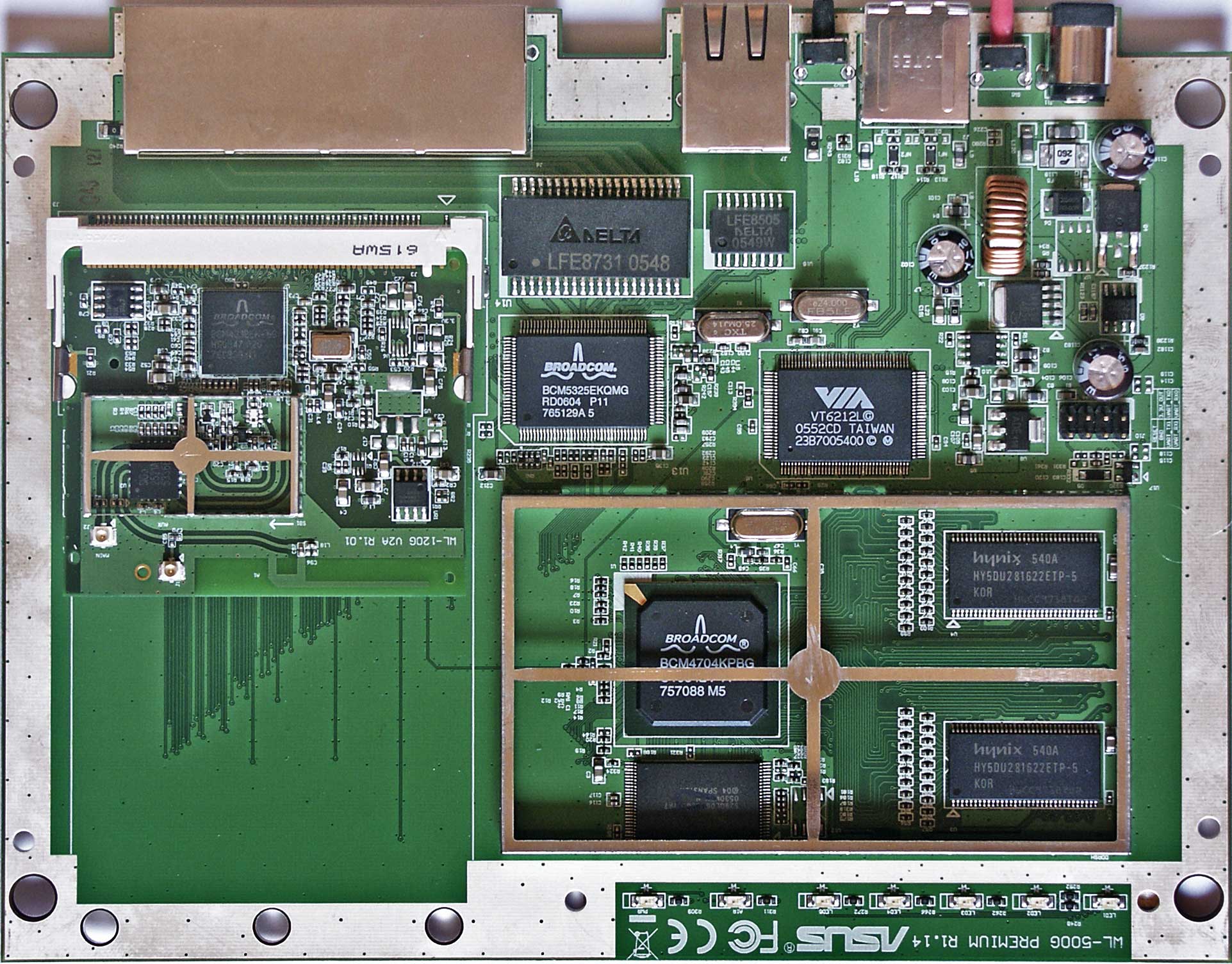
Hardware
- BROADCOM BCM4704KPBG
- BROADCOM BCM5325EKQMG
- BROADCOM BCM4318EKFBG
- SPANSION S29GL064M90TFIR7
- HYNIX HY5DU281622ETP-5
- VIA VT6212L
- SIGE 2521A6
PCI-ID
- 14e4:4704 BCM4704 PCI to SB Bridge
- 14e4:4705 BCM4704 802.11b Wireless LAN Controller
- 14e4:4706 BCM4704 Ethernet Controller
- 14e4:4707 BCM4704 USB Controller
- 14e4:4708 BCM4704 Crypto Accelerator
- 14e4:4318 BCM4318 802.11g Wireless LAN Controller
- 14e4:4319 BCM4318 802.11a/b/g PCI Express Transceiver
http://pci-ids.ucw.cz/read/PC/14e4
@all:
It seems that we need indeed registers info to proceed this way. Reverse engineering the drivers or firmware that mitek mentions (if any) in hope that they
actually use the eeprom interface of these chips might provide a solution... I haven't spoted anything yet but haven't really looked for it that hard either.
We would first need to spot some hardware which implements the eeprom connection with either VT6212L or BCM5325. A "Programmer's Guide" or at least
some datasheets for the BCM4704 would be our heaven, but no such thing in sight anywhere...Does Broadcom only provides these info's under NDA's?
Or even worst, to business partners only, under NDA's too? Do they actually make you swear to eatthe hardcopy of the documents if you let any one
else even have a glimpse on them? Seriously now, has anyone tried to approach them directly?
Inertial
Last edited by Omega; 22-06-2012 at 03:04. Reason: fixed
Junior Member
Hello again!
Let me present some info on the mini-PCI bus and the mini-PCI cards Type III, as the ones found on routers.
The connector has 124 pins. A list of pins and signal names, adapted from PCI Local Bus Specifications Rev 2.3 and pinouts.ru follows:
Code:Mini PCI Card Type III System Connector Pinout Pin Signal Pin Signal Pin Signal Pin Signal 1 TIP 2 RING 63 3.3V 64 FRAME# Key Key 65 CLKRUN# 66 TRDY# 3 8PMJ-3 4 8PMJ-1 67 SERR# 68 STOP# 5 8PMJ-6 6 8PMJ-2 69 GROUND 70 3.3V 7 8PMJ-7 8 8PMJ-4 71 PERR# 72 DEVSEL# 9 8PMJ-8 10 8PMJ-5 73 C/BE[1]# 74 GROUND 11 LED1_GRNP 12 LED2_YELP 75 AD[14] 76 AD[15] 13 LED1_GRNN 14 LED2_YELN 77 GROUND 78 AD[13] 15 CHSGND 16 RESERVED 79 AD[12] 80 AD[11] 17 INTB# 18 5V 81 AD[10] 82 GROUND 19 3.3V 20 INTA# 83 GROUND 84 AD[09] 21 RESERVED 22 RESERVED 85 AD[08] 86 C/BE[0]# 23 GROUND 24 3.3VAUX 87 AD[07] 88 3.3V 25 CLK 26 RST# 89 3.3V 90 AD[06] 27 GROUND 28 3.3V 91 AD[05] 92 AD[04] 29 REQ# 30 GNT# 93 RESERVED 94 AD[02] 31 3.3V 32 GROUND 95 AD[03] 96 AD[00] 33 AD[31] 34 PME# 97 5V 98 RESERVED_WIP 35 AD[29] 36 RESERVED 99 AD[01] 100 RESERVED_WIP 37 GROUND 38 AD[30] 101 GROUND 102 GROUND 39 AD[27] 40 3.3V 103 AC_SYNC 104 M66EN 41 AD[25] 42 AD[28] 105 AC_SDATA_IN 106 AC_SDATA_OUT 43 RESERVED 44 AD[26] 107 AC_BIT_CLK 108 AC_CODEC_ID0# 45 C/BE[3]# 46 AD[24] 109 AC_CODEC_ID1# 110 AC_RESET# 47 AD[23] 48 IDSEL 111 MOD_AUDIO_MON 112 RESERVED 49 GROUND 50 GROUND 113 AUDIO_GND 114 GROUND 51 AD[21] 52 AD[22] 115 SYS_AUDIO_OUT 116 SYS_AUDIO_IN 53 AD[19] 54 AD[20] 117 SYS_AUDIO_OUT GND 118 SYS_AUDIO_IN GND 55 GROUND 56 PAR 119 AUDIO_GND 120 AUDIO_GND 57 AD[17] 58 AD[18] 121 RESERVED 122 MPCIACT# 59 C/BE[2]# 60 AD[16] 123 VCC5VA 124 3.3VAUX 61 IRDY# 62 GROUND 8PMJ = 8 position modular jack connector pin (RJ45)
To help things some more, an image of the actual wi-fi card used in the wl500gP, overlayed with pin numbers and signal names is attached bellow.
Some mechanical specs for type III connectors (adapted from the PCI Local Bus Specifications Rev 2.3) where found and are attached bellow too.
While having a look at the mainboards of wl700gE and wl500W, I noticed two interresting things:
The wl500W seems to have pads for a 68 pins pcb connector(!) on the underside of the mainboard (Bottom Layer). From a quick look i had, it seems that most of the interesting signals of the mini-PCI bus are present there
Wl700gE seems to have pads for a type III mini-PCI connector!
I am currently fighting my way through the PCI Local Bus Specs. Maybe an easier way (?) to approach things would be a PCI-to-PCI Bridge on a mini-PCI card (if such thing exists). This could be used in order to connect a multitude of Mini-PCI cards. I still dont understand all about how PCI's work, and reserve the right to return on the subject after completing my reading...
Inertial
Junior Member
I managed to find a detailed enough picture of the underside of wl700gE mainboard, here in the forum.
82 connected pads out of the 124 on the wl700gE mainboard as opposed to 86 connected pads on the wl120v2, but still it yields a match!
These are indeed pads for a mini-PCI type III connector
Actually, four Reserved pins are left Non Connected at wl700gE as opposed to the WL120V2 wifi card.
Things must be a bit crowded at the PCI bus of wl700gE, between IDE controllers, USB 2.0 Hosts and onboard wifi's. Maybe the IDE controller is on the EBI bus, I will get hold of a wl700gE for a while, that will give me the chance to have a closer look... The wl700gE will be on short loan though, no chances for hardware experimentations...I could probably use some help on that one.
Here goes the picture overlayed with pin numbers and signal names.
Inertial
Student Computer Engineer
wow this is cool stuff
I never really attempted to open my box up... I dont like to break the warranty
verry nice pictures, but some Soldering might be done a bit more cleaner
and no, I'm not really good myself at soldering
Junior Member
It has been there since the beginning - UUP's sighting!
Well these wonderful pads of what seems to be an 8-pin ic, where there, next to the flash chip, on all wl500gP's, wl500w's and wl700gE's, waiting to be noticed...
What that IC might have been remains unclear...
If it was a real time clock, wouldn't it need a back-up battery? most probably yes.
An eeprom then...? but what it's use would be...?
Or do they give access to some internal pins of nearby chips...? Probably not since test points or connector awaiting pads would have been used in that case...
It seems (a wild guess) that there might be the signals of an I2C or an SPI presented there...
Having zero spare time now, it will take a while before I could have a chance to investigate this matter further...
The pads are know to belong to an IC nicknamed U12
If you can shed light on this case... we want to hear from you
Inertial
Bellow is a picture of the UUP's (Unidentified Unsoldered Pads) in question...
 Posting Permissions


