Page 10 of 13 FirstFirst ... 89101112 ... LastLast
Results 136 to 150 of 187

Thread: IPv6 Support

  1. #136
    Quote Originally Posted by wpte View Post
    Sorry Dapper, I'm also not quite sure what the problem is.
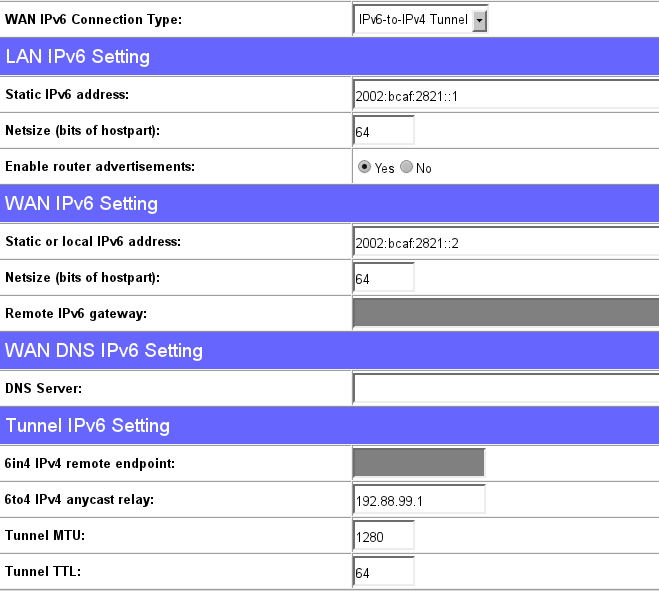
    but concerning the path MTU... are you sure the tunnel mtu and ttl is filled in?
    for mtu I use 1280, and ttl 64.
    perhaps you can try to make the MTU larger?

    for me everything runs fine except "Test with IPv4 DNS record" because I use openDNS, which is a false positive
    Thanks for taking the time to reply. Te details of my configuration can be seen in the screen shot on the previous page. The values for the settings you mentioned are the same.

    When I did an ICMP buffer test, with the router in place, the mtu maximum was 1232, anything above that gave a destination unreachable. The problem is, I'm not sure what the ICMP overhead for IPv6 is. On Ipv4 it's 28 bits.

    There is obviously something wrong with the configuration of my router, but I have no idea what it may be or where to look. As I said in an earlier post, placing the PC in the DMZ and/or disabling the firewall has no effect on the problem, which is simply that with IPv6 enabled, sites sit continuously in the 'waiting for xxxxx site' If I disable IPv6 on the network adapter, I connect instantly. If I remove the router but leave IPv6 enabled and configured on the PC, I connect instantly.

    I'm thinking now I might just reset the router to factory defaults and see what happens. I might also try some different firmware, perhaps Tomato or OpenWRT.

    Final question, could this be an iptables issue, if so, what might it be?

    Thanks

  2. #137
    Join Date
    Dec 2007
    Location
    The Netherlands - Eindhoven
    Posts
    1,767
    Quote Originally Posted by Dapper View Post
    I'm thinking now I might just reset the router to factory defaults and see what happens. I might also try some different firmware, perhaps Tomato or OpenWRT.

    Final question, could this be an iptables issue, if so, what might it be?
    Reset to factory defaults might help. Back in the days IPv6 settings couldn't be saved correctly or something, so it might be a bug from older firmwares
    I had some major trouble when restoring setting files actually.
    obviously you have to manually enter all settings again

    I heard a lot of good stories about tomato, but I'm not to fond of dd-wrt

    ip-tables stopping you from browsing? it sounds very specific to be just an ip-tables issue imo

  3. #138
    Which version of the firmware are you using? I have 1.9.2.7-d-r2381 installed.

    I wasn't that keen on dd-wrt either. Tomato looks interesting, I just need to find a distribution that supports IPv6 and L2TP tunnels. The latter is needed to connect to my ISP. Still, I'd rather not go down that path yet, as I'm mostly happy with the current firmware.

    favour, if I may. If I post screen shots of my config, along with diagnostics, could you take a look and see if you can spot anything...

    Thanks again

  4. #139
    Join Date
    Dec 2007
    Location
    The Netherlands - Eindhoven
    Posts
    1,767
    I'm at revision 2605 at the moment.
    When you flash a newer version try resetting to factory defaults first.
    It might help

  5. #140

    Dead loop on virtual device six0, fix it urgently!

    Hi,
    I'm on 1.9.2.7-d-r2381 (wl500gP) and I have some problems with the 6to4 tunnel.

    I'm able to ping ipv6.google.com from the router. But it does not works from clients. I've found this message in log: "Dead loop on virtual device six0, fix it urgently!"

    I had to ping the ip6 address of the br0 interface. Then I'm able to ping ipv6.google.com from client. I've also found the same error on http://wl500g.info/showthread.php?t=24357&page=4 - but it is unreadable for me :-(

    Code:
    [00:01:15 marian@gool ~]$ ping6 ipv6.google.com
    PING ipv6.google.com(2a00:1450:8007::69) 56 data bytes
    ^C
    --- ipv6.google.com ping statistics ---
    4 packets transmitted, 0 received, 100% packet loss, time 2999ms
    
    [00:01:20 marian@gool ~]$ ping6 ipv6.google.com
    PING ipv6.google.com(2a00:1450:8007::69) 56 data bytes
    ^C
    --- ipv6.google.com ping statistics ---
    4 packets transmitted, 0 received, 100% packet loss, time 2999ms
    
    [00:04:19 marian@gool ~]$ ping6 2002:bcaf:2821::1
    PING 2002:bcaf:2821::1(2002:bcaf:2821::1) 56 data bytes
    ^C
    --- 2002:bcaf:2821::1 ping statistics ---
    16 packets transmitted, 0 received, 100% packet loss, time 14999ms
    
    [00:04:38 marian@gool ~]$ ping6 2002:bcaf:2821::1
    PING 2002:bcaf:2821::1(2002:bcaf:2821::1) 56 data bytes
    64 bytes from 2002:bcaf:2821::1: icmp_seq=8 ttl=64 time=2.65 ms
    64 bytes from 2002:bcaf:2821::1: icmp_seq=9 ttl=64 time=0.771 ms
    64 bytes from 2002:bcaf:2821::1: icmp_seq=10 ttl=64 time=0.760 ms
    64 bytes from 2002:bcaf:2821::1: icmp_seq=11 ttl=64 time=0.724 ms
    64 bytes from 2002:bcaf:2821::1: icmp_seq=12 ttl=64 time=0.758 ms
    64 bytes from 2002:bcaf:2821::1: icmp_seq=13 ttl=64 time=0.728 ms
    64 bytes from 2002:bcaf:2821::1: icmp_seq=14 ttl=64 time=0.703 ms
    64 bytes from 2002:bcaf:2821::1: icmp_seq=15 ttl=64 time=0.723 ms
    64 bytes from 2002:bcaf:2821::1: icmp_seq=16 ttl=64 time=0.722 ms
    ^C
    --- 2002:bcaf:2821::1 ping statistics ---
    16 packets transmitted, 9 received, 43% packet loss, time 15002ms
    rtt min/avg/max/mdev = 0.703/0.949/2.652/0.602 ms
    [00:04:55 marian@gool ~]$ ping6 ipv6.google.com
    PING ipv6.google.com(2a00:1450:8007::69) 56 data bytes
    64 bytes from 2a00:1450:8007::69: icmp_seq=1 ttl=57 time=23.8 ms
    64 bytes from 2a00:1450:8007::69: icmp_seq=2 ttl=57 time=23.9 ms
    64 bytes from 2a00:1450:8007::69: icmp_seq=3 ttl=57 time=23.6 ms
    64 bytes from 2a00:1450:8007::69: icmp_seq=4 ttl=57 time=24.0 ms
    64 bytes from 2a00:1450:8007::69: icmp_seq=5 ttl=57 time=23.9 ms
    64 bytes from 2a00:1450:8007::69: icmp_seq=6 ttl=57 time=24.0 ms
    ^C
    --- ipv6.google.com ping statistics ---
    6 packets transmitted, 6 received, 0% packet loss, time 5006ms
    rtt min/avg/max/mdev = 23.671/23.929/24.089/0.188 ms
    [00:05:09 marian@gool ~]$
    Should I try the -ng firmware?

  6. #141
    Join Date
    Dec 2007
    Location
    The Netherlands - Eindhoven
    Posts
    1,767
    Quote Originally Posted by maros View Post
    Hi,
    I'm on 1.9.2.7-d-r2381 (wl500gP) and I have some problems with the 6to4 tunnel.
    http://translate.google.com/translat...4%26langid%3D3
    you need to set the langid to 3 so russian characters are displayed correctly

    Anyway, why don't you try out more recent firmware?
    Many changes have been made for the ipv6 tunnel.
    Also you might need to reconfigure the router manually for it to work (I had issues with that)

  7. #142
    Quote Originally Posted by wpte View Post
    http://translate.google.com/translat...4%26langid%3D3
    you need to set the langid to 3 so russian characters are displayed correctly

    Anyway, why don't you try out more recent firmware?
    Many changes have been made for the ipv6 tunnel.
    Also you might need to reconfigure the router manually for it to work (I had issues with that)
    Thanks, I probably do. I used the last available for download, but now I've found there is core.dumped.ru.

  8. #143
    Join Date
    Dec 2007
    Location
    The Netherlands - Eindhoven
    Posts
    1,767
    Quote Originally Posted by maros View Post
    Thanks, I probably do. I used the last available for download, but now I've found there is core.dumped.ru.
    and never mention the link in my signature of every post I make

  9. #144
    Quote Originally Posted by wpte View Post
    and never mention the link in my signature of every post I make
    Ouuu. It must be my personal adblock :-(

    Which fw do you recommend? The kernel 2.4 or 2.6 based?

  10. #145
    Quote Originally Posted by maros View Post
    Ouuu. It must be my personal adblock :-(

    Which fw do you recommend? The kernel 2.4 or 2.6 based?
    So I flashed 1.9.2.7-d-r2609. Situation unchanged. Radvd is not started automaticaly, I had to do it manually. And clients are not able to ping ipv6.google.com :-(

  11. #146
    Since no logs and settings described, I'm sure you have IPv6 under/misconfigurated, so it's not FW related issue.

  12. #147
    Quote Originally Posted by theMIROn View Post
    Since no logs and settings described, I'm sure you have IPv6 under/misconfigurated, so it's not FW related issue.
    What logs you need?

    I just found in log these rows:
    Code:
    Jan  1 01:00:09 radvd[78]: attempting to reread config file
    Jan  1 01:00:09 radvd[78]: automatically selecting the prefix and Base6to4Interface are mutually exclusive
    Jan  1 01:00:09 radvd[78]: error parsing or activating the config file: /etc/radvd.conf
    And /etc/radvd.conf content:
    Code:
    interface br0 {IgnoreIfMissing on;AdvSendAdvert on;AdvLinkMTU 1280;prefix ::/64 {AdvOnLink on;AdvAutonomous on;Base6to4Interface vlan1;};};
    Diagnostics log is attached. The strange thing is that I'm able to access ipv6 sites from clients after I connect from one to another client via ssh.

    wl500gP.txt

    Edit: my initial post is there: http://wl500g.info/showpost.php?p=224199&postcount=126
    Last edited by maros; 18-02-2011 at 12:28.

  13. #148
    Quote Originally Posted by maros View Post
    I just found in log these rows:
    Code:
    Jan  1 01:00:09 radvd[78]: attempting to reread config file
    Jan  1 01:00:09 radvd[78]: automatically selecting the prefix and Base6to4Interface are mutually exclusive
    Jan  1 01:00:09 radvd[78]: error parsing or activating the config file: /etc/radvd.conf
    And /etc/radvd.conf content:
    Code:
    interface br0 {IgnoreIfMissing on;AdvSendAdvert on;AdvLinkMTU 1280;prefix ::/64 {AdvOnLink on;AdvAutonomous on;Base6to4Interface vlan1;};};
    currently lan prefix should not be blank or equal x:y:z:0::/64
    wan prefix should not be equal lan prefix.

  14. #149
    Join Date
    Dec 2007
    Location
    The Netherlands - Eindhoven
    Posts
    1,767
    I added documentation on how to configure a tunnel due to the amount of problems and questions
    http://code.google.com/p/wl500g/wiki...IPv6HowTo6in4o
    Obviously things still could go wrong, but this makes things easier

    Also added the link in the first post of this thread
    Last edited by wpte; 09-05-2011 at 20:41.

  15. #150
    Quote Originally Posted by theMIROn View Post
    currently lan prefix should not be blank or equal x:y:z:0::/64
    wan prefix should not be equal lan prefix.
    But this config is automatically generated :-(

    I'm using the 6to4 tunel (not 6in4):


    My radvd config:
    Code:
    $ cat /opt/etc/radvd.conf
    interface br0 {
        AdvSendAdvert on;
        MinRtrAdvInterval 3; 
        MaxRtrAdvInterval 10;
        prefix 2002:bcaf:2821::/64 {
            AdvOnLink off;
            AdvAutonomous on;
            AdvRouterAddr on;
            Base6to4Interface vlan1;
            AdvPreferredLifetime 20;
            AdvValidLifetime 30;
        };
    };

Page 10 of 13 FirstFirst ... 89101112 ... LastLast

Similar Threads

  1. New oleg firmware version
    By Lesiuk in forum WL-500gP Firmware Discussion
    Replies: 713
    Last Post: 13-05-2016, 04:55
  2. Broadcom 63xx SOCs support in linux-mips and OpenWrt
    By goundoulf in forum WL-600g Firmware Discussion
    Replies: 0
    Last Post: 22-10-2008, 17:48
  3. About to remove IPv6 support from the firmware
    By Oleg in forum WL-500g Firmware Releases
    Replies: 7
    Last Post: 25-04-2008, 18:51
  4. HOWTO use your WL-500g as IPv6 router
    By phedny in forum WL-500g/WL-500gx Tutorials
    Replies: 8
    Last Post: 17-02-2008, 07:19

Tags for this Thread

Posting Permissions

  • You may not post new threads
  • You may not post replies
  • You may not post attachments
  • You may not edit your posts
  •